The 2026 guide to zero-touch automation
December 29, 2025
7 minute read
We’ve spent a lot of time on this blog discussing all the ways you can automate IT tasks with a SaaS management platform (SMP). We have also deep-dived into how automation can make IT a lot more efficient, as well as keep employees productive and improve your SaaS security posture.
As SMPs have grown in functionality and extensibility, so too has the power of SaaS workflow automation you can orchestrate. IT leaders can now leverage an SMP to create zero-touch automation that removes every manual touchpoint in an IT process.
Each manual task you automate makes a positive impact on your IT department—and the company as a whole. IT workers no longer have to spend their time on low-value, high-volume toil with thousands of open tabs. Employees get fast access to the tools they need to do their jobs. Your IT environment becomes more secure, and sensitive data is proactively kept safe.
In this article, we’ll answer the following questions to help you learn everything you need to know about zero-touch automation.
- What is zero-touch automation?
- How do I resolve help desk tickets with zero-touch automation?
- How do I improve data security with zero-touch automation?
- How do I use zero-touch automation to protect my IT environment?
What is zero-touch automation?
Zero-touch automation is the orchestration of end-to-end workflows that execute IT processes without manual intervention. In a SaaS-heavy environment, this means using an SMP to bridge the gap between your identity provider (IdP), HRIS, and individual SaaS apps.
Unlike basic automation, zero-touch doesn’t just “help” with a task; it completes the entire lifecycle—from the initial trigger (like a Jira ticket or a status change in Workday) to the final resolution and audit log.
Once in place, a zero-touch workflow can execute hours of IT work in just minutes, error-free.
To get started with zero-touch automation, you need two key pieces in place: a fully featured SaaS management platform and an automation-first strategy. Without an SMP that does everything Gartner says it should, you won’t have the operational power within the platform to build end-to-end zero-touch workflows. An automation-first mindset helps you visualize which IT processes could and should be automated.
You can learn how to create and implement an automation-first strategy in your IT department with our Strategic CIO Manifesto.
There are many processes that can benefit from zero-touch automation, depending on what tasks are costing your IT department the most time and resources. In this article, we will review three use cases:
- Self-resolving tickets that automatically provision app access
- Automatically detecting and unsharing files that contain sensitive data
- Automatically revoking access to unauthorized third-party apps
Other common use cases for zero-touch (or near zero-touch) automation include onboarding, offboarding, and mid-lifecycle changes.
How do I resolve help desk access tickets with zero-touch automation?
For both IT staff and the employees they support, dealing with tickets can be a huge source of frustration. The SaaS explosion in recent years is filling up ticket queues with requests to create new accounts. As requests pile up, employees must wait for access to the tools they need to be productive. IT team members can easily end up spending all of their time as ticket-takers, without any time to focus on strategic work.
With an SMP like BetterCloud, you can orchestrate a zero-touch workflow that resolves these requests automatically—no IT involvement needed. The illustration below shows the six-step process for automatically fulfilling a SaaS access request.
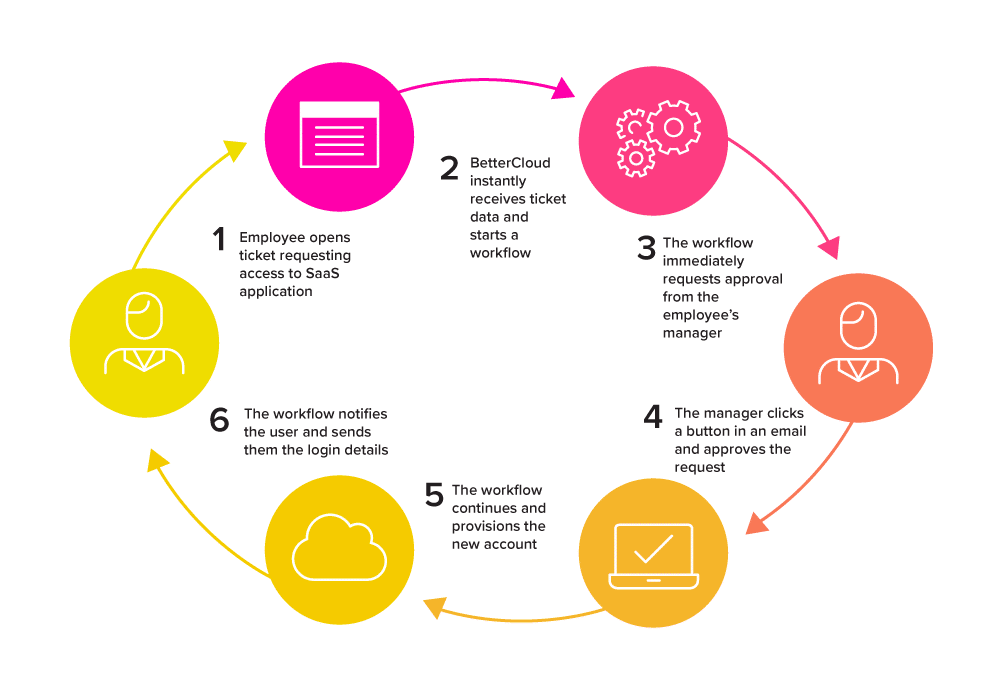
- The employee opens a ticket in an ITSM like Jira or ServiceNow, requesting access to a SaaS application.
- BetterCloud listens for inbound webhook events from your ITSM platform. Once a request is logged, it parses the ticket metadata (e.g., requester, request type, timestamps) and matches it to a predefined workflow using dynamic field mapping.
- The workflow sends a pre-configured email to the employee’s manager.
- The manager opens the email, clicks a button to approve the request, and the workflow continues.
- Once approval is granted, the workflow provisions the new account.
- The workflow then sends a pre-configured email (or Slack message, or both) with the login instructions to the user, and closes the ticket.
For just one application, it is easy to see how this zero-touch workflow can save IT a ton of time. Employees working remotely in different time zones can get much faster access to the apps they need—without waiting for IT to start their day. The more apps you can create these self-service portals for, the more time you save for IT, and the more productive employees across your company can be.
How do I improve data security with zero-touch automation?
There are lots of security solutions out there that provide IT with a long list of alerts and notifications when potentially risky activity occurs in their environment. But in order to remediate anything, IT team members must step in and get involved.
With an SMP like BetterCloud, you can remediate some threats automatically. Zero-touch automations that take actions based on security alerts allow your SaaS environment to “self-heal.” You no longer have to wait for an IT staff member to review each alert, decide if action is needed, and then remediate manually.
In the illustration below, we show one of the ways you can use zero-touch automation to create a self-healing security workflow.
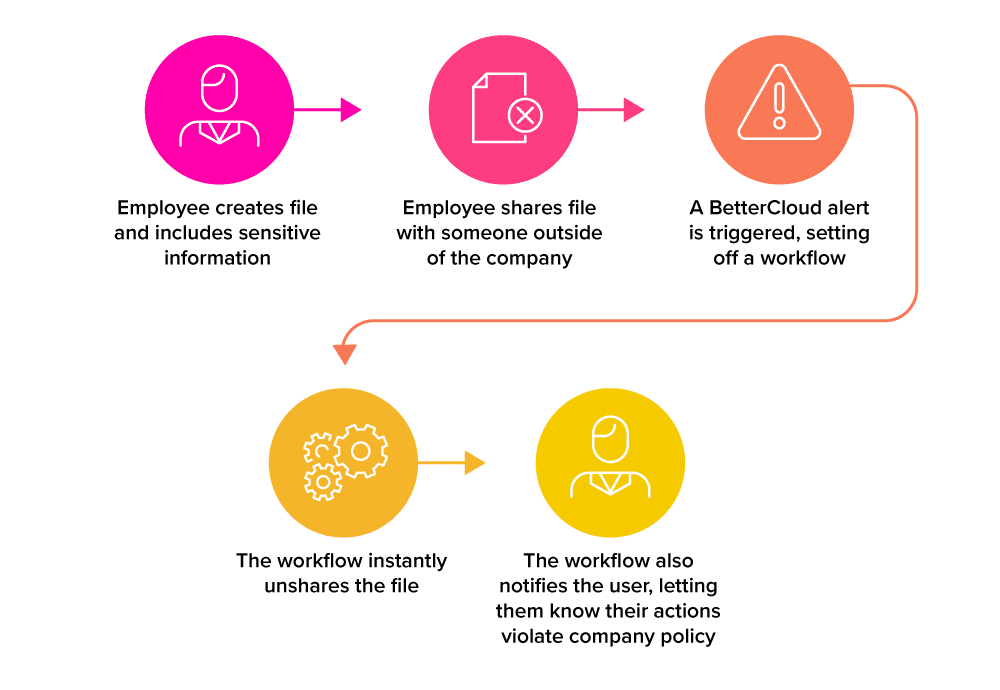
In the example above, we see the following happen:
- An employee creates a share file, such as a Google Doc, and adds in sensitive information.
- The employee then shares the file with someone outside of the company.
- A BetterCloud alert is triggered, which sets off a remediation workflow.
- The workflow immediately unshares the file.
- The workflow also sends the user an email that lets them know that their actions violated company policy. This way they learn about the security risks of sharing sensitive data with those outside the company.
These types of zero-touch remediation workflows can be customized for different types of PII and proprietary information. The workflow above could also be modified to include an approval step before unsharing the file. This way, your IT team could check in with the user or their manager to make sure the document isn’t violating policy before taking any actions that might hamper productivity.
How do I use zero-touch automation to protect my IT environment from shadow IT?
In a perfect world, employees only ever use approved IT apps, on approved devices, through a VPN. The reality of today’s modern workplace is far more chaotic and susceptible to human error. The actions of well-meaning but negligent employees remain one of IT’s biggest security concerns.
In an effort to boost productivity, many well-meaning employees use their work credentials to grant OAuth access to unsanctioned apps. While some apps may be harmless, many more are not. By logging into apps that haven’t been reviewed by IT, negligent employees can put your company at risk of data theft, phishing, and more.
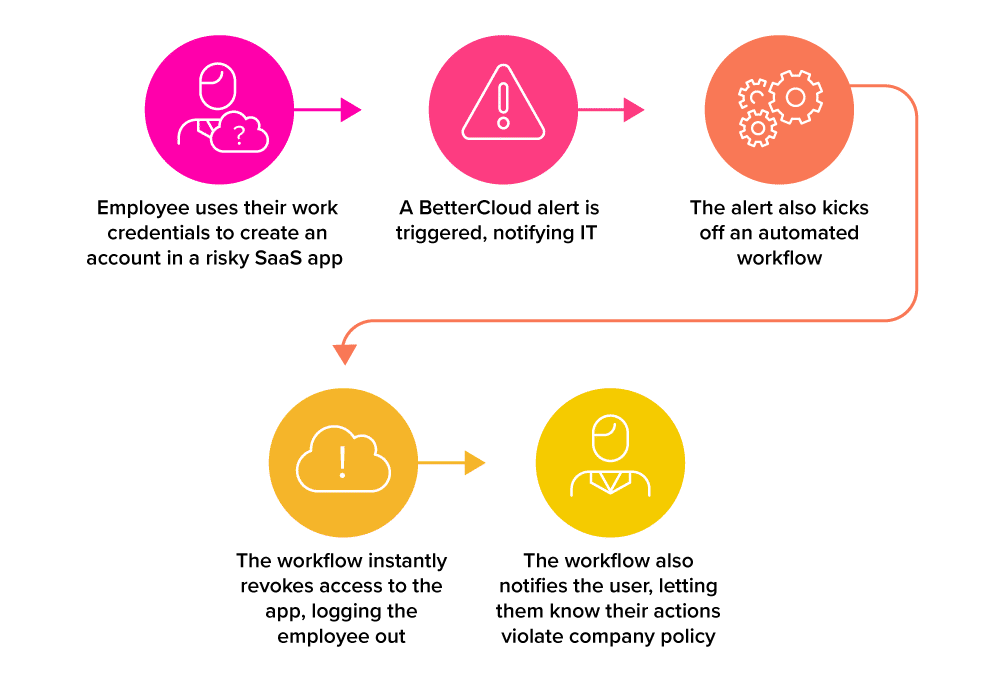
An alert-based, zero-touch workflow can address this risk. The illustration below shows you can automatically remediate shadow IT usage with an SMP like BetterCloud.
- An employee uses their work credentials grant OAuth access to a risky third-party app.
- A BetterCloud alert is triggered, which notifies IT.
- The alert also kicks off an automated workflow.
- The workflow immediately revokes access to the app, logging the employee out.
- The workflow also emails the user to let them know their actions violated company policy, so they learn about the security risks of logging into shadow IT.
The alert-based workflows shown above are just two of many ways you can automate zero-touch remediation in your IT environment. Other workflows can notify IT when super admin accounts are created or remove a departing employee’s app access immediately. Purpose-built to address the risks of SaaS sprawl, an SMP can be a powerful tool to help improve IT’s overall security posture.
Prerequisites for Zero-Touch Maturity
Before moving to a zero-touch model, ensure your infrastructure supports:
- Robust API connectivity: Your SMP must have deep integrations beyond basic SSO.
- Standardized identity data: Clean data in your IdP (Okta, Azure AD) is the foundation for logic-based triggers.
- RBAC (Role-Based Access Control): Clearly defined roles to ensure automated provisioning doesn’t lead to over-privileged accounts.
- Audit readiness: Centralized logs and evidence help you pass audits without manual screenshot hunts.
FAQs
Q: What is the expected ROI for implementing a Zero-Touch strategy?
A: ROI is realized in three main areas:
- Labor savings: By eliminating “low-value, high-volume” manual tickets, IT teams can reallocate hundreds of hours toward high-impact digital transformation projects.
- Security risk mitigation: Automated remediation of data leaks or shadow IT happens in seconds, not hours, significantly reducing the “mean time to respond” (MTTR) to threats.
- Employee productivity: New hires and current staff no longer wait days for app access; they are productive from minute one.
We’ve got a ROI calculator you can use to estimate that here and this SMP impact report you can check out to learn more.
Q: Will zero-touch automation replace the need for IT staff?
A: Not at all. It replaces the toil, not the talent. Zero-touch automation is designed to move IT professionals away from being “ticket-takers” and toward being “system architects.” It allows your team to focus on complex problem-solving, security architecture, and optimizing the SaaS stack rather than resetting passwords or manually provisioning seats.
Q: Can zero-touch automation handle shadow IT without disrupting the business?
A: Yes. One of the greatest strengths of an SMP is its ability to identify unsanctioned OAuth grants. You can set workflows to automatically revoke access to “high-risk” apps immediately, while merely “notifying” IT of “low-risk” apps. This allows for a surgical approach to security that doesn’t hinder employee innovation.
Reduce risk and work smarter with zero-touch automation
The three examples above are just the tip of the iceberg when it comes to what an SMP can automate for IT. This is why an SMP’s ROI often improves over time, even after delivering value within a few months.
With an automation-first strategy and a fully featured SMP, IT leaders can deliver big results with zero-touch automation. They can:
- Pivot IT teams from reactive ticket-takers to strategic business partners, collaborating with other departments to optimize their use of SaaS.
- Keep IT environments safe from the actions of well-meaning, but negligent employees.
- Deliver a frictionless experience for remote employees, ensuring timely access to apps no matter what time zone they are in.
To learn more about how BetterCloud can help you transform your IT department with zero-touch automation, schedule a demo.