
What is a SaaS management platform | The complete 2026 guide
April 7, 2026
16 minute read
The TL;DR on what is a SaaS management platform
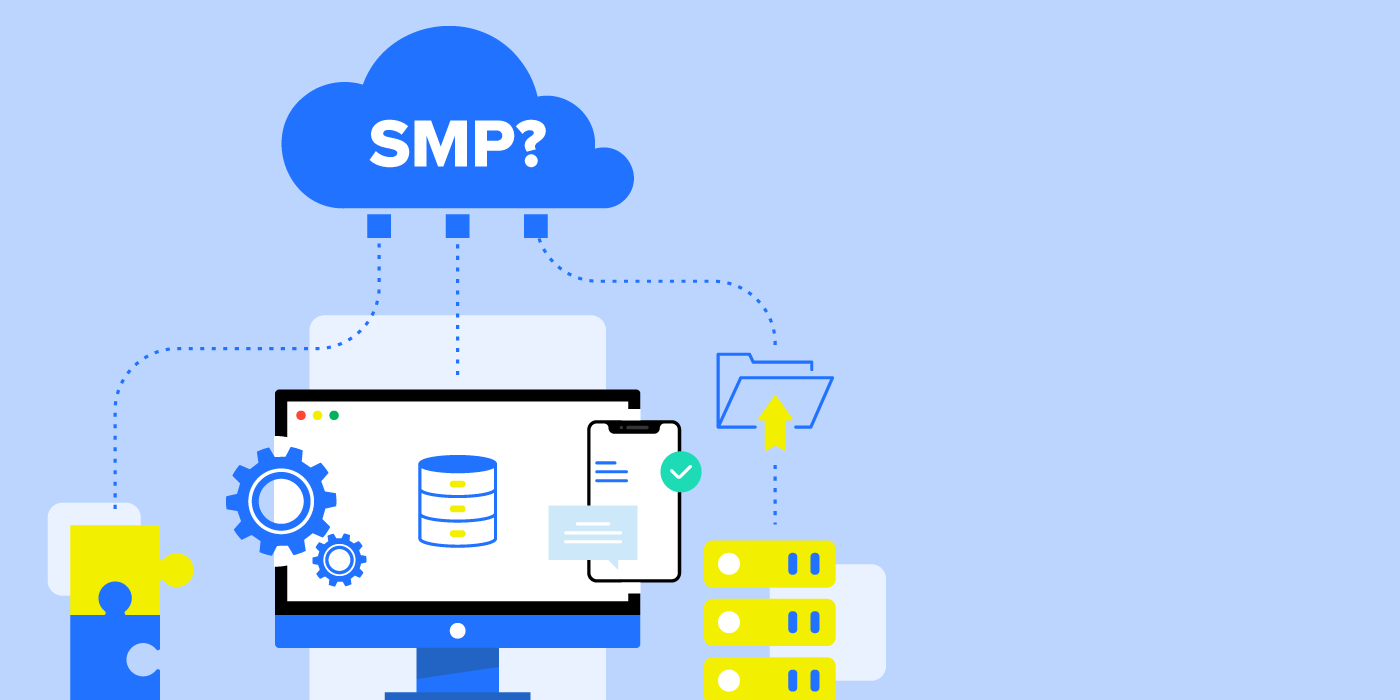
A SaaS management platform (SMP) is a unified software solution for IT teams to centrally discover, manage, and secure all Software-as-a-Service (SaaS) applications across an organization.
In short, an SMP is a vital tool that helps organizations:
- Optimize spend: Easily identify and reclaim unused licenses, reduce shadow IT, and gain complete visibility into all SaaS expenditures.
- Boost IT efficiency: Automate routine, error-prone operational tasks like user onboarding/offboarding, saving time and allowing IT to scale.
- Reduce security risk: Automatically remediate threats and sensitive data oversharing across the entire SaaS landscape.
- Strengthen governance: Establish consistent rules and accountability for access, data handling, and configuration across all SaaS applications.
With the average organization using over 100 SaaS apps, an SMP moves IT from reactive, manual processes and fragmented control to a proactive, automated, and secure management environment. What is a SaaS management platform? A SaaS management platform is a centralized administration software that provides a unified view of an organization’s SaaS (Software-as-a-Service) landscape, enabling IT teams to enforce security policies, manage user access, and optimize spending.
Many definitions of this established technology category have been floating around. But as nearly every company nowadays relies on SaaS, it’s getting clearer what a SaaS Management Platform (SMP) is and what it should do for SaaS Operations (SaaSOps).
Back in 2017, leading analyst firm Gartner first reported on a new category called “Cloud Office Management Tools”. Then the following year in 2018, they renamed this class of tools to be SaaS Management Platforms (SMPs).
Gartner continues to evolve its definition of this tool class. In 2025, Gartner now includes functionalities such as cost optimization, employee self-service via an application store, data-driven insights to improve user adoption and onboarding/offboarding tasks. Into 2026, SMPs increasingly address challenges like generative AI usage, governance, overspend, elevated risk, lack of visibility, contract sprawl, and more.
So now most agree that SaaS management software is a standalone tool that can discover, manage, and secure multiple SaaS applications from a central admin dashboard.
Here we fully explore what SaaS management platforms are by covering:
- Why use a SaaS management platform?
- What is a SaaS management platform, and what does it do?
- Important capabilities in a SaaS management platform
- Who needs a SaaS management platform?
- SaaS management platforms for a changing world
Along the way, we also answer important questions like:
- What features should I look for in a SaaS management platform?
- What are the most common use cases for SaaS management automation?
- What are the key benefits of integrating multiple SaaS applications through a single platform?
- How can automating SaaS workflows improve security posture?
Why use a SaaS management platform?
With every company running on SaaS, a SMP is not just a want, but a need. A SaaS Management Platform helps organizations improve SaaS operations with automation. It also helps organizations reduce overall costs and risk across their tech stack.
Designed to optimize SaaS spend, increase IT efficiency, enhance SaaS visibility, and reduce security risk, IT has deemed an SMP a vital tool because SaaS creates a massive, complex, interconnected sprawl that grows by the day.
“
Since my first experience using BetterCloud about eight years ago, I have taken BetterCloud to every organization I have been a part of. This is the one application that I say sells itself. The value is clear.”
– Elliot Grossman, Director of IT at BARK
Think of all the data objects in SaaS that reference, interact, control, and/or rely on each other, such as: users, groups, mailboxes, files, folders, records, contacts, calendars, third-party apps, logs, metadata, permissions, devices, etc. These are the building blocks of any and all SaaS apps—the very foundation of SaaS operations.
The building blocks are always growing. They are a constantly expanding app, user, and data universe. And when left unchecked, it leads to challenges around discovering, managing, and securing it all.
With no SaaS management platform, what happens?
IT teams fly blind. Organizations are encumbered with unauthorized SaaS and unknown risk.
With no available SaaS usage insight, there’s no way to identify all apps, much less the redundant or unused SaaS apps that only cost them. Further, it’s nearly impossible to control SaaS spend or consistently manage SaaS apps.
So this brings us to the second problem: organizations without an SMP experience: IT can’t manage what they can’t see.
IT teams struggle to manage authorized apps—the ones they do know about—with a mishmash of manual processes within individual SaaS apps. With an average of 106 SaaS apps in use, this means IT teams are prisoner to individual app admin consoles and spreadsheets. All, of course, operate very differently, offering varying levels of sophistication around visibility and control, making it impossible to standardize IT processes like user offboarding.
With no visibility into apps, files, groups, and user interactions or management uniformity, there are new problems.
Without a SaaS management platform, human error creeps in, reducing IT efficiency while threatening an organization’s security posture because it’s impossible to guarantee data security. No IT team can possibly be agile enough to address threats as they arise. And ultimately both the organization’s productivity and security decline.
SMPs address many challenges in the digital workplace
SMPs help IT teams get a complete understanding of critical SaaS apps, users, and their files.
Such actionable insight helps reduce SaaS spend and right-size deployment, save time by centralizing management and automating routine operational tasks, and keep data safe by embedding security best practices. And for good measure, it improves protection for organizations against unauthorized data access, data loss, and data theft.
A SaaS management platform helps optimize software licenses and usage
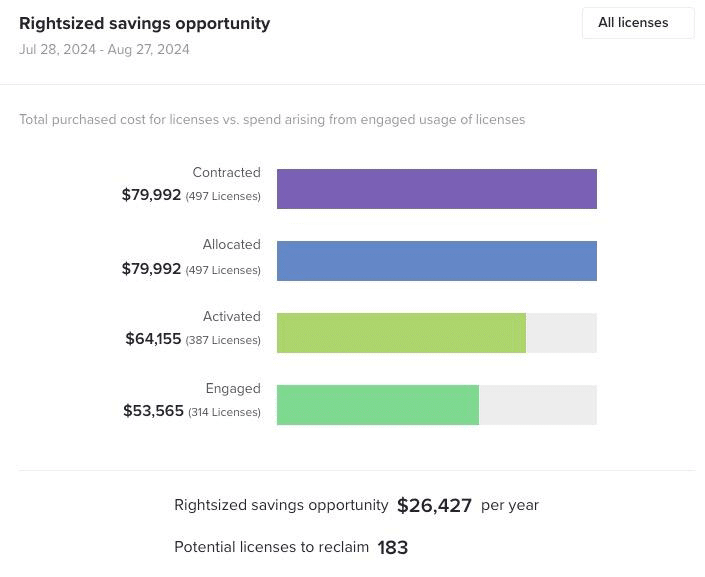
When Finance taps on IT’s shoulder and asks to cut SaaS spend the first place to look is unused licenses. We know software licenses can remain idle, but finding out which ones can be a manual nightmare.
With a SMP, easily determine what software licenses are in use and which are not and act on them instantly.
An SMP helps improve security
It seems like a data breach hits the headlines daily about a disgruntled employee who hacks into an organization or a file with sensitive information leaks. With security the number one concern on IT’s mind, combatting and preventing security incidents is integral.
Incorporating a SaaS management solution into your security posture can help continuously monitor your tech stack and empower your employees to keep your environment secure.
A SaaS management platform helps rid your tech stack of shadow IT
Given that employees have the ability to add new software to your tech stack without your knowledge in as easy as it is to say “1, 2, 3”, it’s no wonder IT is concerned about shadow IT.
SaaS Management software helps reduce shadow IT by offering a single pane of glass into your tech stack and integrations directly with your ERP to detect hidden software.
Ultimately, an SMP helps optimize SaaS spend, increase IT efficiency, grow visibility, and reduce security risk. So when trying to understand what a SaaS management platform is, it’s important to keep these benefits in mind.
Let’s go back to the basics of an SMP.
What is a SaaS management platform, and what does it do?
An SMP is essentially a unified governance and automation layer placed over your entire SaaS stack.
At its core, a SaaS management platform provides a central place to automatically:
- Discover SaaS apps in use throughout the organization
- Manage users, apps, spend, files, and user interactions with company data
- Secure company data
In this section, we review use cases and benefits of using an all-in-one SaaS management platform.
Common SaaS management use cases for SMPs
You can rely on an SMP to perform many tasks like:
- Spend reporting: Improve budget allocation with auditable spend reporting across all applications including narrowing down spend by employee or department.
- Spend and license optimization: Pair software usage insights with automated policies to flag tool overlaps, eliminate unused licenses, and with it, the money spent
- Least privilege access enforcement: Limit administrator access to settings and controls needed for the individual to do their job. Auto-apply policies to limit admin rights, group memberships, and permissions; revoke unused access after set periods.
- SaaS governance and configuration management: Ensure user, group, and file settings are correct from the start and remain secure.
- File sharing security remediation and data exposure alerts: Discover sensitive content stored across SaaS applications and automatically remediate sensitive information oversharing, as well as automatically detect and respond to threats to always comply with laws and standards.
- Compliance and audit support – Automating reporting, policy enforcement, and continuous monitoring to maintain standards like SOC 2, GDPR, or HIPAA.
- User lifecycle management (on/offboarding and mid-cycle changes): Automate onboard, offboard, and mid-lifecycle user change processes to reduce human error, risk, and save valuable time.
What are the most common use cases for SaaS management automation?
SaaS management automation streamlines repetitive, error-prone tasks across the SaaS lifecycle, boosting efficiency and consistency. While each organization uses a SaaS management platform to meet unique needs, there are some trends.
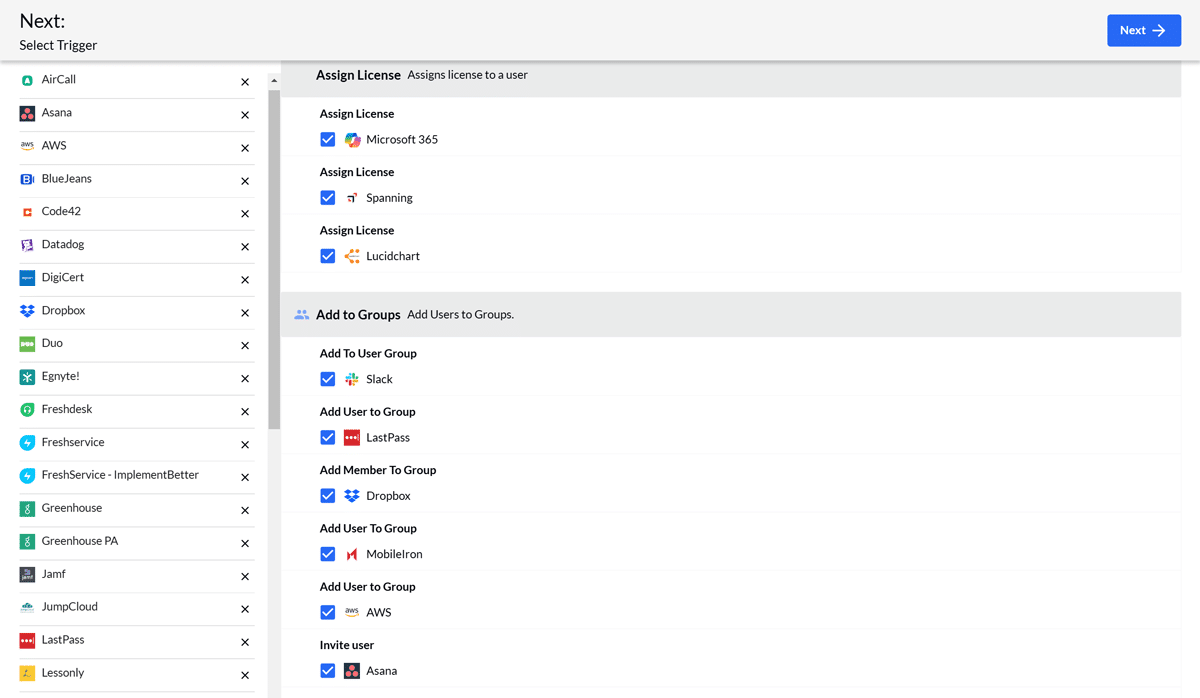
As for what are the most common use cases for SaaS management automation; they include user lifecycle management, SaaS license reclamation, access governance and policy enforcement. They all help IT reduce human error, save time, and scale operations as SaaS sprawl grows.
SMPs act as a governance layer in the IT stack
As such, to accomplish these tasks, SaaS management platforms integrate with several other systems. These could be a Cloud Access Security Broker (CASB), identity provider, an ERP or account system, IT service management tool (ITSM), or a human resources information system (HRIS). They’ll also integrate with cloud productivity apps like Google Workspace and Microsoft 365.
Additionally, a SaaS management platform must discover SaaS apps and integrate them for management. To accomplish this, it must be able to constantly ingest large quantities of data, normalize it, and graph all data objects across the SaaS environment.
This process is the foundation of operational context critical to effectively managing and securing applications.
Now let’s talk about how your IT gains.
What are the key benefits of integrating multiple SaaS applications through a single platform?
Integrating multiple SaaS applications via a single SaaS management platform creates a unified ecosystem and boosts SaaS governance. It does this by eliminating silos and enabling seamless data/context flow.

Key benefits include:
- Centralized visibility and control: A single pane of glass for all apps (including AI-powered apps), users, spend, files, and interactions, reducing blind spots
- Streamlined workflows and efficiency: Automated data sync and cross-app actions (no manual re-entry or switching consoles), cutting time on routine tasks
- Improved data accuracy and consistency: Real-time synchronization provides a single source of truth, minimizing errors and duplicates
- Enhanced collaboration: Teams access unified insights, enabling faster decisions and better cross-department alignment (IT, Finance, Security, HR)
- Stronger security and risk reduction — Consistent policy enforcement, automated threat detection/remediation, and reduced exposure from disconnected tools
- Cost savings and scalability — Easier license optimization, shadow IT detection, and adding new apps without proportional complexity.
Overall, this integration turns fragmented SaaS into a cohesive, manageable environment that supports business growth.
Important capabilities in a SaaS management platform
In turn, this operational context is what powers the benefits of a SaaS management platform. It enables IT to optimize SaaS spend, increase IT efficiency, grow visibility, and reduce security risk.
So without a powerful engine to continuously process all SaaS-related data objects, many SaaS management platforms will simply fall short of their promise. They will be limited in the capabilities they bring to a customer.
So what other capabilities make up a SaaS management platform?
Not all SaaS management platforms are the same in all areas. Here, we cover the basic capabilities that a product should have to maximize benefits of SaaS spend optimization, IT efficiency, improve visibility, and cut risk.
Optimize SaaS spend with these capabilities:
- A single pane of glass showing all apps and their associated spend in the SaaS environment, sanctioned or unsanctioned
- Ability to review, categorize, and label applications and software contracts
- Uncover savings opportunities with overlapping products, unused applications, and employee-centric insights
- Multiple application discovery methods, like OAuth, accounting system integrations, and browser extensions
- Expanded visibility into users, usage, license types, and permissions
Increase IT efficiency with these functions:
- Customizable, sequential-step automation
- Industry standard best practices in pre-built automation templates
- No-code, IT-centric scalable automation
- Ability to leverage context from different applications
- Automation execution notifications and audits
- A large and growing marketplace of pre-built integrations to connect to any SaaS app in use now and in the future
- Easy extensibility to “non-native” or custom applications using an API
Grow visibility by taking advantage of these capabilities:
- Ability to integrate multiple SaaS applications including those containing files like Dropbox or Google Workspace
- Visibility into files across SaaS applications, including those generated or shared by Generative AI tools and Autonomous Agents
- Ability to identify file state and exposure
- Advanced sorting and filtering to quickly identify risk and other insights
- Customizable alerts on changes made to file metadata
- Cross-SaaS remediation to notify and adjust file metadata one-off, in bulk, or automated
Reduce security risk with these functions:
- Ability to integrate multiple SaaS applications including those containing files
- Leverage pre-set data identifiers
- Leverage custom data identifiers
- Sensitive data sharing alerts according to security policy
- Ability to take surface level actions
- Scanning for data at rest within SaaS apps
- Granular remediation according to security policy, specifically addressing risk introduced by Generative AI and third-party AI tools
How can automating SaaS workflows improve security posture?
Automating SaaS workflows directly strengthens security by minimizing human error, enforcing policies consistently, and enabling proactive responses.
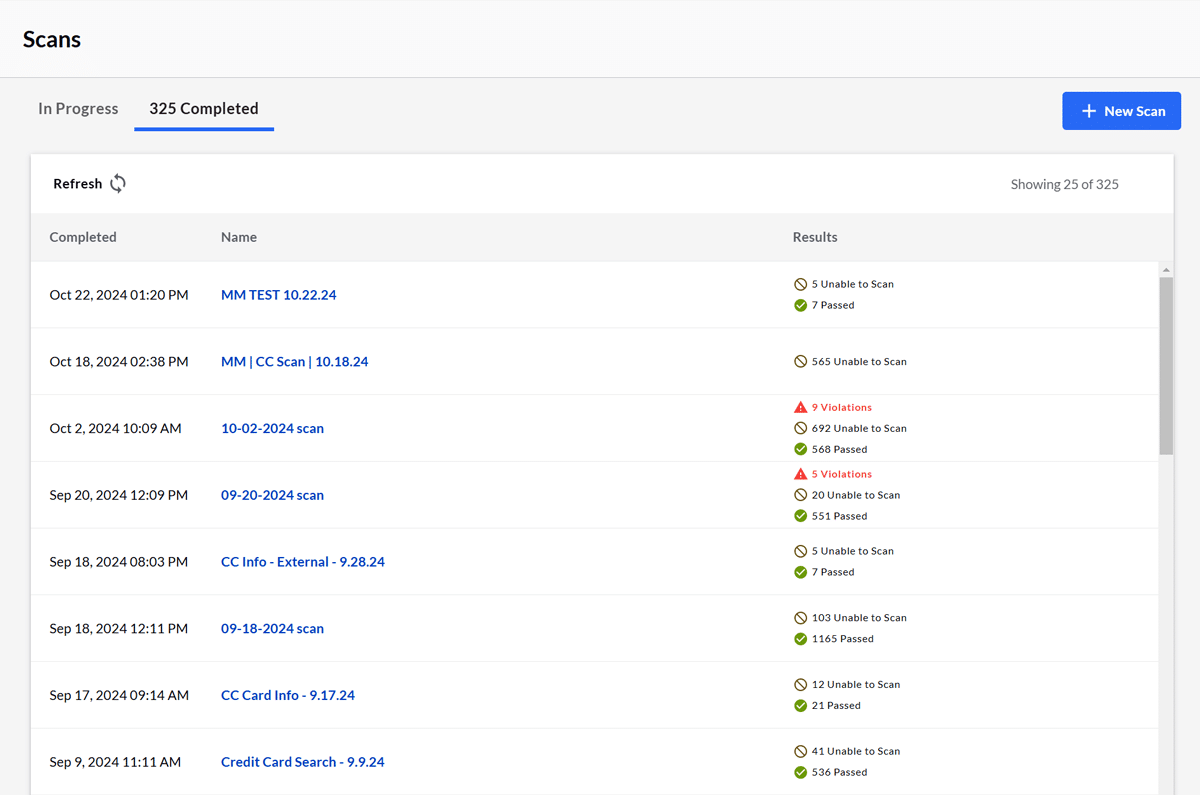
The main ways it improves security posture:
- Reduces manual errors and delays — Automates offboarding to instantly revoke access (preventing insider threats or orphaned accounts) and enforces least-privilege rules without oversight gaps.
- Enforces consistent policies at scale — Applies uniform security configurations (e.g., file sharing restrictions, MFA requirements) across all apps, eliminating inconsistencies from manual admin work.
- Enables real-time monitoring and remediation — Triggers automated alerts and actions on suspicious behavior, oversharing, or compliance violations, containing threats faster than manual processes.
- Limits excessive permissions — Auto-detects/removes unnecessary admin rights or public shares, aligning with zero-trust principles.
- Supports continuous compliance — Automates audits, reporting, and remediation to maintain standards, reducing risk during rapid SaaS changes or employee turnover.
- Mitigates insider and external risks — Timely automation (e.g., deprovisioning on departure) prevents data leaks, while usage-based revocation curbs unauthorized access.
In 2026’s threat landscape, workflow automation shifts security from reactive to preventive, significantly lowering overall risk.
Let’s move onto talking about important features now.
What features should I look for in a SaaS management platform?
When evaluating what is a SaaS management platform and choosing the right one, focus on robust, scalable features that address discovery, management, security, and automation in today’s environment.
After helping thousands of companies manage their SaaS stacks, we think you should prioritize the following features:
- No-code workflow automation with pre-built templates for onboarding, offboarding, access changes, and cross-app actions
- Comprehensive app discovery to surface sanctioned and shadow IT via multiple methods like OAuth, expense integrations, and browser extensions
- Centralized spend visibility and optimization like usage analytics, unused license reclamation, contract categorization, and AI-enhanced savings recommendations
- Many deep integrations for connectivity to identity providers, HRIS, ERP, ITSM, and core suites like Google Workspace/Microsoft 365, as well as many market-leading SaaS apps and AI
- Advanced security and compliance tools such as sensitive data scanning, real-time alerts, least-privilege enforcement, automated remediation, and custom identifiers).
- Granular visibility and reporting to include file-level insights, user behavior analytics, audit trails, and customizable dashboards
- Scalability and API extensibility for custom apps and future-proofing as SaaS, autonomous AI agents, and native-AI tools evolve
These features ensure the platform delivers unified control, reduces manual effort, and adapts to hybrid/remote work and emerging threats.
So now that you know the answer to “What is a SaaS management platform?” and understand its capabilities, let’s move on to the next question. Who needs them?
Most organizations need a SaaS management platform
SaaS management platforms are relevant across all business functions, particularly IT, human resources, procurement, finance and legal or departments with sensitive data. They’re also useful across all industry sectors, including fast-growing SaaS companies, as well as established organizations with intellectual property or customer lists to protect.
In fact, you’re at a disadvantage if your organization doesn’t use one.
According to the 2025 Gartner Magic Quadrant for SMPs report, “Through 2027, organizations that fail to centrally manage SaaS life cycles will remain five times more susceptible to a cyberincident or data loss, due to incomplete visibility into SaaS usage and configuration. Through 2027, organizations that fail to attain centralized visibility and coordinate SaaS life cycles will overspend on SaaS by at least 25%, due to unused entitlements and unnecessary, overlapping tools.”
Yet, even though an SMP is critical today, it’s important to remember that maximizing the value of a SaaS management platform is a journey. Adoption comes in phases.
First comes implementation and discovery of the SaaS sprawl and SaaS spend. The next stage, once a SaaS management platform is in place, is to automate IT operational processes. Finally, the last stage is to implement more complex, cross-application security policies. And once those are up and running, you should continually audit, improve, and enhance your automations and optimize software spend to truly get the most out of the platform.
But if your organization has a digital workplace or is moving towards becoming one, you need a SaaS management platform now. The longer you wait, and SaaS adoption continues unabated, IT and security challenges only mount.
SaaS management platforms for a changing world
When thinking about SaaS management platforms, you need to consider how they accommodate our rapidly changing world. New generative-AI tools have the fastest adoption in history and commonplace autonomous AI agents are around the corner.
This is why tools like the combined CoreStack and BetterCloud platform are becoming crucial. Together, they deliver a comprehensive governance fabric for the autonomous enterprise to support three core areas:
- Orchestrating autonomous systems: Enables visibility into how AI agents, SaaS applications, and cloud services interact across the enterprise—eliminating blind spots and controlling the rise of “shadow AI” wherever it might be.
- Human-defined, machine-executed control: Enforce established policies, guardrails, and business intent centrally and automatically across cloud, SaaS, and AI-driven workflows without manual intervention.
- Unified FinOps and value governance: Bridge cloud infrastructure and SaaS spend into a single financial and operational model—optimizing cost while enabling reinvestment into high-velocity AI initiatives.
As you start your own journey to understanding more about what a SaaS management platform is and what it can do for your organization, it’s important to consider a vendor’s legacy, commitment, and leadership in this space.
Here are some questions you should ask.
- How deep are their roots in SaaS and in SaaS management?
- How mature is their no-code automation?
- As SaaS APIs constantly change, how well does the platform vendor keep up? What’s the depth of automated actions you can take with these integrations?
- How well do they support remote users?
- How large is their marketplace of pre-built integrations where the larger the inventory, the greater the time and cost savings?
- Is the SaaS management platform constructed to offer deep operational context to automate security alerting that doesn’t add to the already unmanageable alert fatigue?
- How well does it support your governance needs of full visibility and control over apps, AI agents, and user access across SaaS and cloud?
- What are the methods the platform uses to discover SaaS spend and provide governance over both cloud and SaaS spending
- How well does it work with AI governance platforms that manage cloud spend?
Once you know what SaaS management platforms are, and get answers to the above questions, you’ll find that only one SaaS management platform vendor stands out amongst the rest.
Meet BetterCloud
BetterCloud, a Corestack company, is the market leader for SaaS management, enabling IT professionals to transform their employee experience, maximize operational efficiency, optimize SaaS spend and centralize data protection. With no-code automation enabling zero-touch workflows, thousands of forward-thinking organizations rely on BetterCloud to automate processes and policies across their SaaS application portfolio.
With 10+ years of experience pioneering the SaaS Operations movement, BetterCloud now serves the world’s largest community of SaaSOps experts. As publisher of The State of SaaS Report, the category’s definitive market research, BetterCloud is praised by customers as a consistent G2 Leader, as well as a G2 2026 Best Product for Data Privacy and 2026 Best Product for IT Management Tools. In addition, BetterCloud is also recognized by leading analyst firm, Gartner, as a 2025 Magic Quadrant Leader for SaaS Management Platforms.
Ready to hear more about what is a SaaS management platform? Learn how to easily and quickly set up BetterCloud, and then check out an interactive demo.
EDITOR’S NOTE: THIS IS AN UPDATE FROM A 2024 ARTICLE.
FAQs on what is a SaaS management platform
Q: What is a SaaS Management Platform?
A: SaaS Management Platforms are tools that help IT teams discover, manage, and secure SaaS applications across an organization.
SMPs provide:
- SaaS application discovery
- User access visibility
- Automated onboarding and offboarding
- Privilege auditing
- Policy enforcement across SaaS environments
Q: Why use a SaaS management platform?
A: Organizations use a SaaS management platform to centralize governance and control over their entire SaaS environment. Key reasons include:
- Optimizing SaaS spend: Gaining complete visibility into application usage to identify and reclaim unused licenses, reduce shadow IT, and lower overall software costs.
- Increasing IT efficiency: Automating critical and repetitive SaaSOps tasks, such as user lifecycle management (onboarding and offboarding), which reduces manual effort and human error.
- Reducing security risk: Enforcing consistent security policies, managing least-privilege access, detecting data oversharing, and automatically remediating threats across all connected applications.
- Enhancing visibility: Providing a single pane of glass for discovering, managing, and securing all sanctioned and unsanctioned SaaS applications, users, and data interactions.
Q: What features should I look for in a SaaS management platform?
A: The essential features you should prioritize in a SaaS management platform are those that ensure comprehensive visibility, strong governance, efficient automation, and robust security, especially given the rise of generative AI tools. Look for a platform with:
- No-code workflow automation: For streamlining routine tasks like onboarding/offboarding, license reclamation, and cross-application security actions.
- Comprehensive app discovery: Methods (like OAuth, expense integrations, browser extensions) to find and categorize all sanctioned and shadow IT.
- Centralized spend optimization: Tools for usage analytics, unused license reclamation, contract tracking, and AI-enhanced savings recommendations.
- Deep integrations: Extensive connectivity to Identity Providers, HRIS, ITSM, and core SaaS suites (Google Workspace, Microsoft 365) to ensure a unified view.
- Advanced security capabilities: Sensitive data scanning, real-time alerts, least-privilege enforcement, automated remediation, and compliance support.
- Scalability and Extensibility: An architecture that supports a growing SaaS portfolio, custom applications, and the governance of emerging AI agents and native-AI tools.
Q: What are the most common use cases for SaaS management automation?
A: The most common use cases for SaaS management automation center on efficiency, security, and cost control across the SaaS lifecycle. They include:
- User lifecycle Management (ULM): Fully automating the onboarding, offboarding, and mid-cycle change processes across all connected SaaS applications to ensure immediate access revocation (critical for security) and consistent provisioning/deprovisioning.
- SaaS license reclamation and optimization: Automatically identifying dormant or underutilized user licenses based on usage data and taking action (e.g., deactivating or downgrading) to reclaim that spend and reduce overall software costs.
- Access governance and least-privilege enforcement: Consistently applying security policies by automatically adjusting user permissions, limiting administrative access, and revoking public file shares, which is vital for compliance and reducing risk, especially as AI tools introduce new vectors for data exposure.
- Shadow IT discovery and remediation: Continuously scanning and integrating with financial and network systems to detect unsanctioned applications and automatically enforcing policies to control their usage and associated risk.
Q: What are the key benefits of integrating multiple SaaS applications through a single platform?
A: Integrating multiple SaaS applications through a single platform, like an SMP, delivers several key benefits focused on establishing unified governance and centralized control over the entire digital workplace. These benefits include:
- Centralized governance and control: Provides a “single pane of glass” view over all applications, users, files, and spend, allowing IT to enforce policies and manage the entire SaaS ecosystem from one place, thus eliminating fragmented control.
- Enhanced security and compliance: Ensures consistent security policy enforcement (e.g., least-privilege access, data sharing restrictions) across all integrated apps, significantly reducing the risk of data leaks and automatically supporting compliance with standards like GDPR or SOC 2.
- Improved operational efficiency: Streamlines complex, cross-application workflows (like onboarding/offboarding) through automation, eliminating manual, error-prone tasks and allowing IT to scale operations without proportional increase in complexity.
- Optimized spend and resource allocation: Offers comprehensive usage analytics across all applications, making it easy to identify redundant tools, reclaim unused licenses, and allocate budget based on actual needs, thereby maximizing ROI.
- Better data integrity and context: By normalizing and centralizing data from disparate apps, the platform provides deep operational context, which is essential for informed decision-making and precise, automated action (e.g., knowing who shared what file where).
Q: What does the combination of BetterCloud SaaS management platform and Corestack provide to IT?
A: Corestack is the leading agentic governance OS for FinOps and BetterCloud is the leading SaaS management platform, so it’s a natural fit as enterprises of all sizes increasingly adopt cloud, SaaS, and AI. The combined CoreStack and BetterCloud platform delivers a comprehensive governance fabric for the autonomous enterprise to support three core areas:
- Orchestrating Autonomous Systems: Provides visibility into how AI agents, SaaS applications, and cloud services interact across the enterprise—eliminating blind spots and controlling the rise of “shadow AI.”
- Human-Defined, Machine-Executed Control: Enforces established policies, guardrails, and business intent centrally and automatically across cloud, SaaS, and AI-driven workflows without manual intervention.
- Unified FinOps and Value Governance: Bridges cloud infrastructure and SaaS spend into a single financial and operational model—optimizing cost while enabling reinvestment into high-velocity AI initiatives.