

7 IT tasks you should fully automate in 2026 shown (with workflow examples)
May 12, 2026
10 minute read

IT teams in 2026 are being asked to do more with less… again. (It’s not Groundhog day… just feels like it.)
The ticket queue isn’t getting smaller. SaaS environments keep growing. And somehow, the same repetitive work keeps coming back: onboarding, offboarding, access requests, password resets.
Most teams aren’t short on ideas for what to automate. Spend a few minutes in Reddit threads like “what do you wish you could automate?” or scroll through Hacker News discussions on internal tooling, and you’ll see the same answers come up every time.
The challenge isn’t identifying the work, it’s automating it in a way that’s reliable, maintainable, and doesn’t create new problems.
That’s why more IT teams are prioritizing automation for the tasks they know will keep showing up while moving away from one-off scripts toward cross-app workflows with guardrails, visibility, and auditability.
Below are 7 IT workflow automation examples SaaS teams are focusing on in 2026, along with what it takes to do each one safely.
1. User onboarding that actually gets employees productive on day 1
Most onboarding processes still rely on coordination across multiple systems and people. HR creates the record. IT provisions accounts. Managers request access. Something inevitably gets missed.
The result is familiar. A new hire logs in on their first day and does not have access to the tools they need. Productivity is delayed, and IT is pulled into a series of reactive fixes.
Automation changes onboarding from a checklist into a single, streamlined workflow. When a new employee is added to your HR system or identity provider, that event can initiate everything that follows. Accounts are created across core systems. SaaS applications are assigned based on role. Group memberships and permissions are applied consistently. Even welcome communications can be automated.
The impact is significant. Automated onboarding reduces onboarding time by 78 percent on average, saving about an hour and forty minutes per user. For organizations hiring at scale, that quickly adds up to hundreds of hours saved every year.
More importantly, onboarding becomes predictable. Every employee in the same role receives the same access. That consistency reduces both friction and risk.

The key to doing this safely lies in the data. Automation depends on having a reliable source of truth for roles, departments, and reporting structure. If that data is inconsistent, automation will simply propagate the problem faster.
A practical approach is to start with clearly defined role templates and test them with a small group before rolling them out broadly. Once the structure is validated, onboarding becomes one of the highest impact automations you can implement.
2. Handle app access requests through Slack
Access requests are one of the most common sources of IT workload. They also tend to be one of the least efficient processes.
A typical request involves a ticket, manual review, back and forth with a manager, and eventual provisioning. Each step introduces delay and inconsistency.
What has changed is where work happens. Employees already operate in collaboration tools like Slack. Bringing access requests into that environment simplifies the process immediately.
Instead of opening a ticket, a user submits a request directly through Slack through BetterCloud’s Self-Service Agent. The system identifies the correct approver based on organizational data and routes the request automatically. The manager approves within Slack, and access is provisioned without additional IT involvement.

This shift does more than save time. It standardizes approvals and creates a clear audit trail. Every request is tracked. Every approval is tied to a specific manager. Every action is logged.
Automation in this area also contributes to measurable productivity gains. Self service workflows for access requests and other common tasks can eliminate a significant portion of help desk work, saving an average of 48 hours for every 100 tickets resolved through automation .
The risk comes from inaccurate organizational data. If reporting structures are outdated, requests may be routed to the wrong approver. That can slow down the process or lead to incorrect access decisions.
Ensuring that your identity system reflects current reporting relationships is critical. Once that foundation is in place, Slack based access workflows can dramatically reduce ticket volume while improving control.
3. Optimize and adjust group management policies
If there’s one task that perfectly captures the “doing more with less” headache, it’s managing user groups. It’s a classic example of low-impact, repetitive work that balloons over time. What starts as a simple access request (“Can you add Jane to the ‘Marketing Projects’ group?”) slowly morphs into a sprawling, tangled web of permissions across Google Workspace, Okta, and Entra ID.
The manual “solution”? An endless cycle of ticket requests and painful, spreadsheet-driven audits that are outdated the moment you finish them. This is precisely the kind of work that’s a prime candidate for full automation.
The goal isn’t just to clean up the mess, but to automate the entire lifecycle of a group so it never becomes a mess in the first place.
Here’s how you can fully automate it with workflows:
- Automate the audit & initial cleanup: Instead of manually exporting lists from each app, you get immediate access to view and manage your groups across source-of-truth systems like Okta, EntraID, Google, and Slack. From there, you can utilize filters to quickly get a view into what needs to be automatically deleted… and you can even use one of the numerous actions available to remove the culprits in bulk.
- Automate onboarding & offboarding: This is the most critical piece. You can tie group membership directly to your automated onboarding and offboarding workflows. When a new hire joins the sales team in your HRIS, the workflow doesn’t just create their account; it automatically adds them to the correct “Sales Team” groups in Google, Okta, and any other relevant app. When they leave, you can utilize that same logic in reverse within your offboarding workflow; ensuring access is revoked everywhere, instantly.
- Automate access control: Run a workflow for users to request the access they need through Slack, a Google Form, a Jira ticket, etc., and automatically determine what access they can get immediately versus what requires an approval (which is also automated!).
- Automate time-based access: For contractors, temporary projects, or high-risk access, you can automate access that expires. Build a workflow where users are granted access for a set period (e.g., 30, 60, or 90 days), and when the time is up, their permissions are automatically revoked without any manual intervention – or, you can confirm that they’re either continuing on in this same role or being promoted to FTE. That, of course, can then trigger your typical employee onboarding flow to grant the proper amount of access for today!
By shifting from manual tasks to automated workflows, you’re not just managing groups; you’re creating a secure, self-healing system that frees up your team from the repetitive work that keeps them stuck in the ticket queue.
4. Assign file ownership and clean up orphaned data
When employees leave, their data often remains behind in a fragmented and unmanaged state.
Files may still be owned by the departed user. Sensitive information may remain accessible in ways that are difficult to track. Manual cleanup is inconsistent and time consuming.
Automation allows you to bring structure to this process. When a user is offboarded, their files can be automatically reassigned based on predefined rules. Ownership might transfer to a manager, a team account, or a shared drive. Access can be adjusted to maintain continuity without exposing data unnecessarily.

This is also an area where automation directly improves security posture. More than 85 percent of organizations using automated SaaS management report that they have avoided data breaches related to incorrect settings, improper sharing, or flawed offboarding processes. (Source)
The risk in this workflow is not speed but accuracy. Transferring ownership incorrectly or deleting data prematurely can disrupt business operations.
To mitigate this, ownership transfer should always happen before any deletion or cleanup actions. Maintaining detailed audit logs ensures that every change is traceable and reversible if needed.
When implemented carefully, this automation reduces both operational burden and data risk.
5. Letting HR trigger offboarding workflows
Offboarding is one of the most critical processes in IT. It is also one of the most time sensitive.
Delays in revoking access create real security exposure. Manual processes rely on notifications, tickets, and follow up, all of which introduce lag, and that lag has consequences.
The good news is that offboarding can be triggered before IT even gets involved.
HR teams can initiate offboarding directly from Slack using BetterCloud’s Self-Service Agent. Rather than filing a ticket or sending an email, an HR team member submits the request in Slack, and BetterCloud handles the rest. This includes deprovisioning accounts, reckoning access, and reassigning resources automatically, without requiring IT to manually coordinate each step.
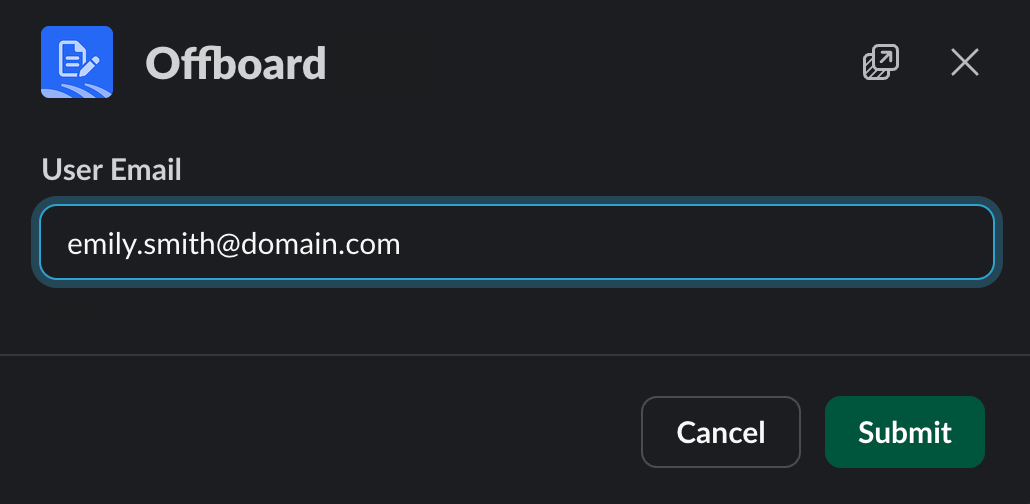
For organizations that want an even more seamless experience, offboarding can be triggered automatically from your HRIS. When an employee record is updated or a termination event is logged in a system like BambooHR, that event can kick off a BetterCloud workflow immediately, no human hand required.

That said, automated HRIS-triggered offboarding only works as well as the data behind it. If your HRIS is your reliable source of truth (updated promptly and consistently when employees leave), this approach is highly effective. If there’s any lag between an employee’s last day and when that change is reflected in your system, or if your data hygiene has room to improve, triggering from Slack may be the safer starting point.
Not sure which approach is right for your environment? A BetterCloud expert can help you evaluate your current data sources and determine the best trigger for your offboarding workflows. The goal is the same either way: access gets revoked the moment it should, every time, without relying on anyone to remember to start the process.
6. Reclaim inactive SaaS licenses automatically
SaaS spend has become one of the fastest growing areas of IT budgets. At the same time, a significant portion of that spend is tied up in unused or underused licenses.
The challenge is identifying inactivity in a consistent and actionable way. Manual reviews are time consuming and often incomplete.
Automation allows you to define inactivity thresholds and act on them. If a user has not accessed an application within a defined period, their license can be flagged. After a notification period, it can be reclaimed and made available for reassignment.

This process not only reduces costs but also improves operational efficiency. By freeing up licenses automatically, organizations avoid unnecessary purchases and ensure that resources are used effectively.
The risk in license reclamation is removing access too aggressively. Some users may rely on applications intermittently but still require access.
To avoid disruption, it is important to define reasonable inactivity thresholds and provide advance notification. Users should have a simple way to retain access if needed or to regain it quickly if it is removed.
7. Seasonal employee provisioning and deprovisioning
For organizations with seasonal or contract workers, access management becomes a cyclical challenge.
During peak periods, large numbers of users need to be onboarded quickly. When those periods end, access must be removed just as efficiently. Manual processes struggle to keep pace with these fluctuations.
Automation introduces a time based model. Access can be granted based on a defined start date and automatically removed based on an end date. Extensions can be handled through simple updates rather than entirely new workflows.

This approach ensures that access is always aligned with employment status. It also reduces the burden on IT during periods of rapid change.
Accuracy is critical in this scenario. Incorrect dates can lead to users being locked out prematurely or retaining access longer than intended.
To mitigate this, automated reminders can be sent before deprovisioning events, giving managers an opportunity to confirm or extend access. Audit logs provide visibility into all actions taken.
When implemented correctly, this automation allows organizations to scale their workforce without scaling their IT workload at the same rate.
In retail? We’ve got just the article for you.
Okay, what should I not automate?
By this point, it is easy to assume the goal is to automate everything.
It is not.
The most effective IT teams are selective. They automate the workflows that are repeatable, predictable, and well understood. Just as importantly, they avoid automating the areas where automation is more likely to create problems than solve them.
Knowing what not to automate is part of building a mature automation strategy.
One-off tasks
If something only happens once or very infrequently, automation is usually not worth the effort.
Building, testing, and maintaining a workflow takes time. If the task itself only takes a few minutes and is unlikely to repeat, automation can actually introduce more overhead than it removes.
There is also a tendency to overengineer solutions for edge cases. A unique request comes in, and instead of handling it manually, time is spent building a workflow that may never be used again.
Automation delivers value through repetition. If a process is not repeated often enough, it is better handled manually.
A good rule of thumb is simple. If you have not done it at least three times, and do not expect to do it regularly, it probably does not need automation.
Poorly defined processes
Automation depends on clarity.
If a process is inconsistent, undocumented, or frequently debated, automating it will not fix those issues. It will amplify them.
This is one of the most common mistakes teams make when getting started with automation. They try to automate workflows that are still evolving or that rely on tribal knowledge rather than clear rules.
For example, if onboarding varies significantly depending on who is handling it, or if access decisions are made differently by different managers, automation will simply lock in that inconsistency at scale.
Before automating any workflow, it should be clearly defined:
- What triggers the process
- What steps are required
- What decisions need to be made
- What the expected outcome is
Once those elements are consistent, automation becomes much safer and more effective.
In many cases, the act of preparing a process for automation reveals gaps that need to be addressed first. That alone can be valuable.
High-risk destructive actions without guardrails
Some actions carry more risk than others.
Deleting accounts. Removing access across multiple systems. Permanently deleting data. These are not tasks where speed should come at the expense of control.
Automation can still play a role here, but only when proper safeguards are in place.
Without guardrails, a single incorrect trigger or data issue can lead to widespread impact. A misconfigured workflow could deactivate active users or remove access from an entire group. A faulty script could delete data that cannot be recovered.
This is where safety patterns become critical.
High-risk automations should always include:
- Approval steps for critical actions
- Delays or holding periods before irreversible changes
- Clear logging and audit trails
- The ability to stop or roll back workflows
In some cases, it is appropriate to keep a human in the loop for the final step, even if everything leading up to it is automated.
Automation is most powerful when it reduces effort without removing control. In high-risk scenarios, control should always come first.
The goal isn’t to automate everything.
It’s to automate the work that keeps coming back and the work that’s easiest to get wrong manually.
If your team is still handling these tasks through tickets, spreadsheets, or scripts, you’re probably feeling it every day.
Start with one or two of these workflows, get them right, and expand from there.
Done well, automation doesn’t just save time, it gives you back control over an environment that’s only getting more complex.
Want to start saving time with BetterCloud? Give us a ring. Want to see more blogs like this? We’ve got two more! One here and here.


