


Key steps for managing your SaaS spend
June 4, 2025
6 minute read

Considering the average company spends money on an average of 106 SaaS apps (2025 State of SaaS), there needs to be an effective way to manage the software budget. What are the crucial steps for managing SaaS spend?
We’ve boiled it down to three broad and action-packed activities including:
- Performing a SaaS audit
- Optimizing licenses and apps
- Creating smart SaaS cost control processes for governance
Three steps for better managing your SaaS spend
There’s a big difference between saying you want to save money and actually doing it. The key is taking actionable steps you can take to get the ball rolling. These three high-level ones will allow you and your team to know your SaaS stack, spot common SaaS spend mistakes, how to fix them, and make sure they never happen again.
1. Conduct a thorough SaaS audit
One of the biggest mistakes people make is skipping the most important step in managing SaaS spending – the SaaS audit. After all, you can’t manage your SaaS spending or identify potential overspending without total visibility into all applications, usage, logins, contracts, and associated costs.
Discover your SaaS stack to find all apps and accounts
Together with operations, legal or finance, IT can manually review employee expense reports or credit card statements.
You and your stakeholders should answer the following questions:
- Which products are you paying for?
- What function do they provide?
- Is this program obsolete or out of date?
- How much do they cost?
- How many people use them?
- Is it duplicate to another program you pay for?
- When does the contract expire?
By working together to answer these questions, a clear picture of the organization’s software landscape emerges. Make sure you surface all SaaS apps, and then describe each one by business app owner, department, costs, contract cancellation or renewal dates, and core functionality it provides.
In the end, you’ll uncover apps you didn’t know about, identify redundant capabilities across different departments, and other opportunities for SaaS cost savings.
Alternatively, you can use some kind of SaaS asset management software like an all-in-one SaaS management platform. This tool automates discovery and continuously monitors for Shadow IT, often identifying new SaaS apps as soon as a user authenticates using your domain’s email.
Review usage and logins data
You need to know how often an app gets used. To a limited degree, if your company integrates an app with a single sign-on vendor, you can manually review logins to uncover usage patterns and find SaaS savings. This process can reveal SaaS licenses that are no longer needed or used. Look for:
- Unused apps from any user with no logins for 30/60/90 days
- Unused apps from individual employees available for reallocation with no logins for 30/60/90 days
- Underutilized apps where users don’t meet required usage threshold
Another way to surface data and metrics to identify trends in SaaS app and usage patterns is to use a tool that automates SaaS spend optimization. Some, though, may present cost saving recommendations better than others.
Familiarize yourself with SaaS vendor contracts
Many businesses are so preoccupied with getting the best deal they can on the price that they ignore other parts of their contract. Things like termination fees, auto-renewals, and SLA can cost you money if you’re not paying close enough attention. What looks like a good deal upfront can quickly spiral out of control. Let’s go over some of the key features of SaaS contracts that you should pay attention to determine if you should let contracts expire or can terminate them right away.
- Effective date: The effective date of your contract is when your contract actually kicks in. For some businesses, your effective date is the same day you sign your contract. But for others, you might have to wait until the first of the month or the start of the quarter.
Don’t assume your effective date is the same day you sign your contract. Check with your SaaS provider before making any decisions. Carelessness with your contract management at this stage could leave you without a service for days or even weeks. Never cancel an old SaaS service without making sure you’re covered by your new effective date first.
- Contract term: A contract term is simply the length of time the contract you signed is in effect. If you’re hoping to make changes to your current contract, most companies will make you wait until your contract term has expired. Always review the details around your contract term before signing any paperwork. It’s also important to know when your contract is ending before making big decisions.
- Contract termination window: Some contracts have a built-in termination window that allows you a grace period to cancel your contract without any penalties. Not all contracts have this built-in. You’ll need to check with your SaaS provider to see if there’s a termination window within your agreement.
- SLA: The service level agreement (SLA) is one of the most important parts of your contract. It sets the standard for the service you’ll be receiving for the duration of your partnership and outlines your expectations from the vendor, metrics by which service is measured, expected timelines, and penalties should either party fail to deliver.
This is the ultimate CYA section of your contract. Without a well-structured SLA portion of your contract, a vendor could legally keep you on the hook for a contract where they deliver nothing. It’s crucial to always double-check the SLA agreement before signing anything.

Looking to save on your upcoming software renewals? Watch the webinar packed with tips to unlock real savings.
2. Optimize licenses and eliminate overlapping SaaS apps and accounts
More than $40 billion is spent on unused SaaS tools each year and your company is very likely throwing away limited software dollars on orphaned, underused, and duplicate SaaS apps.
$40 billion on average, is wasted by businesses on unused SaaS tools every year.
Source: G2
Our next step for managing SaaS spending is right-sizing user entitlements and creating standardized tool libraries. By optimizing entitlements, you align user needs to license tiers, and organization-wide tool standards cut redundancy.
Where to start for right-sizing entitlements? Look for orphaned accounts or apps. It’s obvious that you let these contracts expire.
For apps with duplicate accounts from the same vendor, you consolidate them to get the volume pricing or additional features that come with bigger license counts.
While not always easy to settle on a company standard for any SaaS tool category, you should select the vendor that is most essential for driving value and eliminate the others as contract expirations allow.
To identify the most essential applications, evaluate each app’s ROI based on user insights. Make sure you know how users feel, too. Quick employee pulse surveys help ensure that cost-saving initiatives do not compromise productivity or critical business operations.
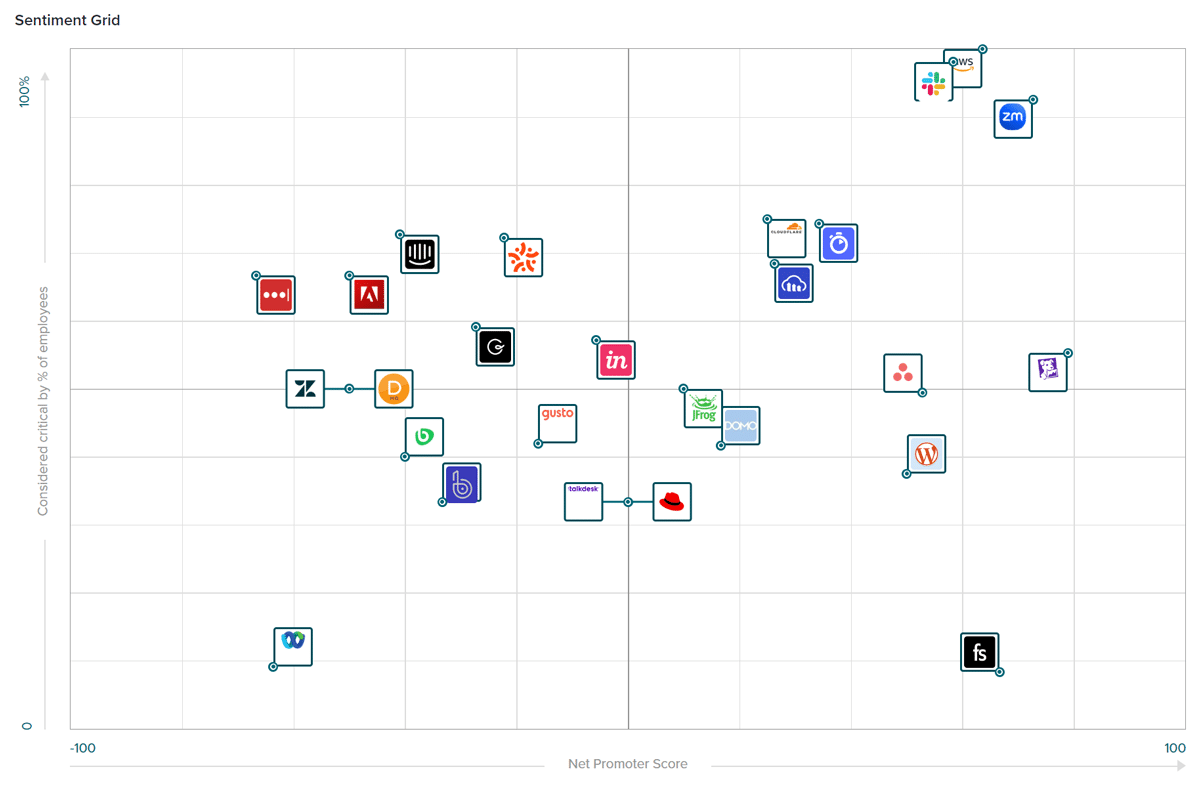
By optimizing apps and licenses, you can directly reduce wasted spending, free up budget and enhance your overall software ROI.
3. Create ongoing SaaS cost control processes
SaaS cost control is the set of processes for how an organization manages all aspects of SaaS spending. Properly done, you operate based on an agreed upon, corporate-wide framework to ensure apps align with business, security, and compliance requirements.
The foundation is generally dedicating all purchasing decisions to IT and finance, as well as creating and using a SaaS purchase approval workflow.
Monitor SaaS usage
SaaS governance also outlines how often IT monitors license usage per user and department. It also lays out requirements for usage thresholds and other metrics that IT tracks.
Keep all vendor contracts in one place
Managing your SaaS vendor contracts is more than just a one time occurrence. Losing track of them and spending excessive time on mundane tasks is a surefire way to waste money. Without a way to easily track key contract dates, it could lead to accidental renewals that keep you on the hook for another contract period, or to inadvertent cancellations that disrupt business operations. Neither one is a good outcome.
Enforce governance with a SaaS management platform
Using a SaaS management platform (SMP) with robust SaaS spend management capabilities is a crucial, time-saving step in SaaS governance.
Eliminating duplicate SaaS accounts and apps and fine-tuning your contracts barely scratches the surface of what the right SaaS management platform can do. With an SMP like BetterCloud, you can:
- Automate ULM (User Lifecycle Management) events such as onboarding and offboarding employees
- Centralize control over SaaS licenses and monitor product utilization
- Facilitate SaaS contract management
- Automate key help desk ticket resolutions
- Track spending and forecast the costs of SaaS subscriptions
- Protect against inappropriate file sharing and protect sensitive company data
- Set up user roles and granular permissions automatically
No more missing contract deadlines or playing catch-up when a new employee starts. With a SaaS system of record like BetterCloud, you can start saving time and money by eliminating needless SaaS spend and tedious tasks. Your team can securely sync accounting, financial, IT, and single sign-on systems in one setting.
No matter the size of your company, a SaaS management tool can make your job and your life a lot easier!
The key to eliminating SaaS waste is working ahead, staying on top of your contracts, and always looking toward the future.
Use BetterCloud: Your most important step in managing SaaS spend
As a 2025 Gartner® Magic Quadrant™ Leader and consistent G2 Grid® Leader, BetterCloud has long been dedicated to discovering, managing, securing, and automating the SaaS user lifecycle – of all apps, vendors, users, files, contracts, spend, and budgets.
Our market-leading expertise that goes back to 2011, together with trust from our customers like ScottsMiracle-Gro – helps us anticipate SaaS management pain points, innovate to keep our customers one step ahead, to ultimately save you time and money.
To learn more about how BetterCloud can help you take the right steps to manage your SaaS spend, request a demo.


