


Product Tip Tuesday: Transfer a departing employee’s dropbox files to their manager
January 6, 2026
4 minute read
When an employee leaves a company—whether through a planned resignation or a sudden termination—the clock starts ticking for the IT department. Tensions can run high, and the risk to company data is real. If access to sensitive files isn’t revoked immediately, you face the threat of data exfiltration, accidental deletion, or malicious tampering.
Why manual file ownership transfer is a liability
In Dropbox, files are often “owned” by the individual creator. If an account is simply deleted without a proper handoff, critical project data can vanish or become inaccessible to the remaining team.
To maintain business continuity, your offboarding checklist must include transferring file ownership to a manager or a functional lead. However, doing this manually is a recipe for burnout:
- The “context switch” tax: You have to hunt down the employee’s email, identify their manager in your HRIS or IdP, and cross-reference both in the Dropbox Admin Console.
- The error margin: One wrong click or a typo in an email address can lead to orphaned data or, worse, granting file access to the wrong person.
- The notification gap: After the transfer, you still have to manually Slack or email the manager to let them know where the files are.
The Reality: For most IT admins, this is a repetitive cycle of “click, after click, after click.” It’s not just boring; it’s inefficient.
Automating the Offboarding Workflow with BetterCloud
To reclaim your time and harden your security posture, you can automate this entire sequence by integrating BetterCloud with Dropbox and your Identity Provider (IdP) like Okta, Google Workspace, or OneLogin.
Instead of a manual checklist, you can build a zero-touch workflow that triggers the moment an employee is deactivated.
How the automated workflow functions
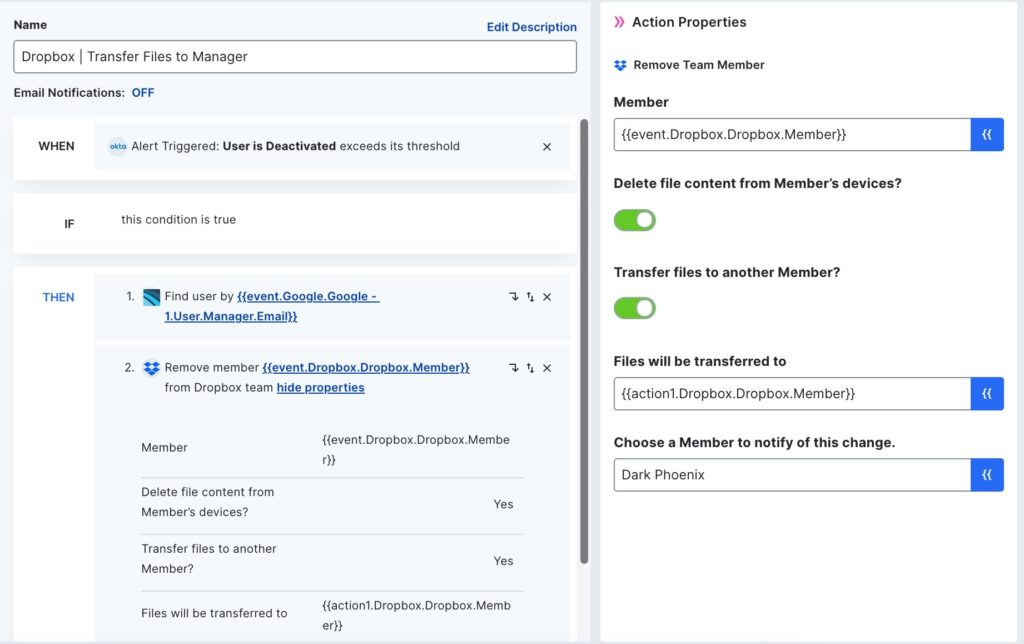
In this sample workflow, when a departing employee’s Okta account is deactivated, BetterCloud finds the employee’s manager’s email address in Google Workspace. Next, the departing team member is removed from Dropbox. Inside of this action, one activated toggle switch removes the employee’s access to the Dropbox files downloaded to their connected devices. A second toggle transfers file ownership to the manager, and a dropdown box selection notifies a current IT team member about the changes. With one click, this entire process happens automatically.
In summary:
- The trigger: An employee’s status is changed to “Deactivated” in Okta (or your preferred IdP).
- The intelligence: BetterCloud automatically queries Google Workspace or your HRIS to identify the departing employee’s direct manager.
- The action: BetterCloud initiates the “Remove Member” action in Dropbox.
- The security layer: Within the workflow, you can toggle “Wipe data from connected devices,” ensuring that synced company files are wiped from the user’s personal laptop or phone the moment they lose access.
- The handoff: A second toggle automatically transfers all file ownership to the manager identified in step two.
- The audit trail: Finally, the system sends an automated Slack or email notification to the IT team and the manager, confirming the transfer is complete.
By incorporating a similar process inside of their offboarding workflow, BetterCloud customer Blue Apron reduced their offboarding time from four hours to 10 minutes.
FAQs
What happens to a user’s files if I delete their Dropbox account manually?
If an account is deleted without a formal ownership transfer, any files “owned” by that individual can become inaccessible or permanently deleted. This creates “orphaned data” which can disrupt ongoing projects and lead to permanent data loss for the organization.
How does BetterCloud identify the correct manager for the file transfer?
BetterCloud acts as a bridge between your tech stack. It uses an intelligence layer to query your Identity Provider (IdP) or HRIS—such as Okta, Google Workspace, or OneLogin—to automatically identify the departing employee’s direct manager. This eliminates the need for IT to manually cross-reference org charts.
Can I ensure company data is removed from the employee’s personal devices?
Yes. The automated workflow includes a “Wipe data from connected devices” toggle. When triggered, this ensures that any synced company files are wiped from the user’s laptop or mobile device the moment their access is revoked.
Which Identity Providers (IdP) are compatible with this workflow?
BetterCloud’s automation supports major identity and access management platforms, including:
- Okta
- Google Workspace
- OneLogin
Is there a way to notify the manager once the files have been transferred?
Absolutely. You can configure the workflow to send an automated notification via Slack or email. This informs the manager and the IT team that the transfer is complete and provides the location of the files, removing the “notification gap” found in manual processes.
How much time can I realistically save by automating this?
While results vary by organization size, the blog highlights that Blue Apron reduced their offboarding processing time from four hours down to just 10 minutes by implementing these automated workflows.
Does this workflow provide an audit trail for compliance?
Yes. Because the process is centralized through BetterCloud, every action—from the initial deactivation trigger to the final file handoff—is logged. This provides a clear, reliable audit trail for security and compliance reviews.
Check out our technical knowledge base to learn more about workflows, including pre-built workflow templates you can customize.


