Product Tip Tuesday: 5 things you’re not doing with BetterCloud (that you should be)
December 2, 2025
4 minute read

Whether you’ve been a BetterCloud user since 2011 or just joined us yesterday, you know that managing a growing SaaS portfolio is complex. While you might be leveraging BetterCloud for foundational tasks like user lifecycle management, BetterCloud is more than just an automation platform—it’s an end-to-end SaaS management platform!
If you’re only scratching the surface of what the platform can do, you’re missing out on some seriously powerful time- and money-saving capabilities.
Here are five things you can (and should) be doing with BetterCloud to supercharge your operations.
1. Streamline approvals with Wait for Approval via Slack
BetterCloud users already love the “Wait for Approval” action. As a reminder, this action is available in workflows as a natural checkpoint to ask an individual via email—like a manager or a department head—for approval before the workflow continues.

But email isn’t the only way approvals can be done automatically. You can streamline the entire approval process by sending the approval request directly to Slack! This meets the approver where they already work, allowing them to approve or deny the request with a single click, dramatically reducing delays in workflows like onboarding, access provisioning, or high-level deprovisioning.
Wondering how you can use Wait for Approval differently? Check out this blog.
2. Enforce MFA policies
At this point, multi-factor authentication is an established security best practice; however, enrollment often requires some course of action by the end user. This creates a challenge for IT teams. It’s difficult to keep track of who has or hasn’t set up MFA across various SaaS applications.
BetterCloud’s MFA alerts give IT and security teams visibility into which users have or haven’t enrolled in MFA for G Suite, Box, Slack, Okta, and Zendesk. BetterCloud also allows you to prohibit users from gaining access to sensitive data by placing them in a restricted OU until they have enrolled in MFA. Check out this post to learn more.
3. Use conditional logic to supercharge a single workflow
Building separate workflows for every team or scenario leads to unnecessary complexity and technical debt. With BetterCloud’s conditional logic (branching), you can streamline everything into one master workflow.
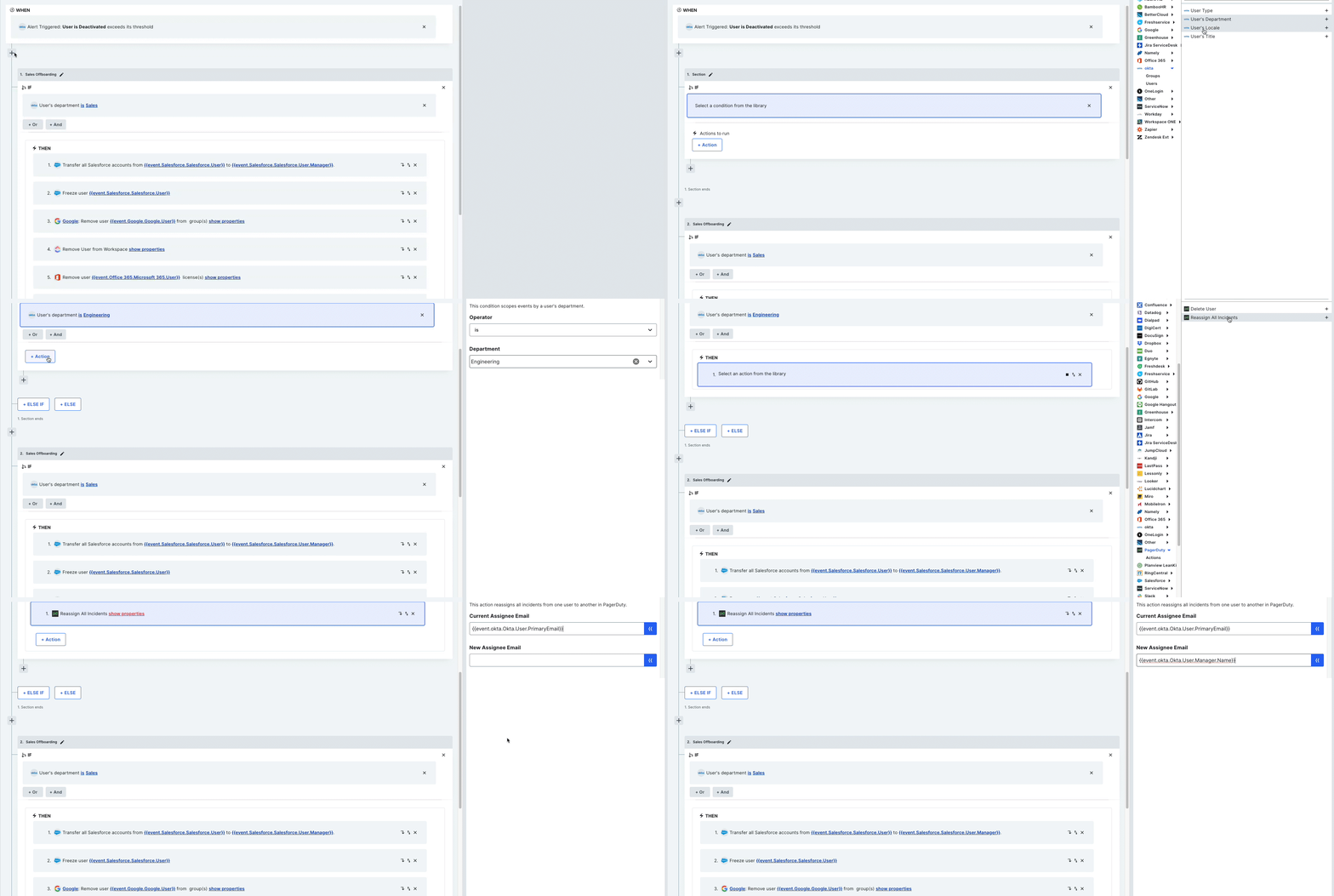
Example: Instead of 10 different deprovisioning workflows, build one workflow that intelligently branches:
- Is the user in Sales? → Transfer HubSpot data
- Is the user in Engineering? → Reassign GitHub repos
- Is the user in Marketing? → Update shared drive access
This approach:
- Reduces clutter
- Increases maintainability
- Simplifies onboarding and offboarding
- Supports more dynamic automation across your organization
Conditional logic is essential for scalable IT automation as your SaaS environment grows.
4. Enable your end users to self-serve in Slack
How many requests does your IT team field every day for simple tasks like resetting a password, adding a user to a Slack channel, or requesting access to a standard application?
With BetterCloud’s Self-Service Agent, you can offload these repetitive, low-priority tasks and empower your end users to resolve their own issues—without ever leaving Slack.

Configure a set of approved self-service requests (like password reset for G Suite, creating a new shared channel, or requesting a license to a specific application) that are triggered by a simple command in Slack. BetterCloud handles the execution in the backend, saving your IT team from constant interruption and freeing them up for high-value projects.
5. Save time and money with license reclamation
SaaS sprawl means that your organization likely has a significant number of unused or underutilized licenses costing you money every month. BetterCloud offers powerful, automated license reclamation capabilities to solve this problem.
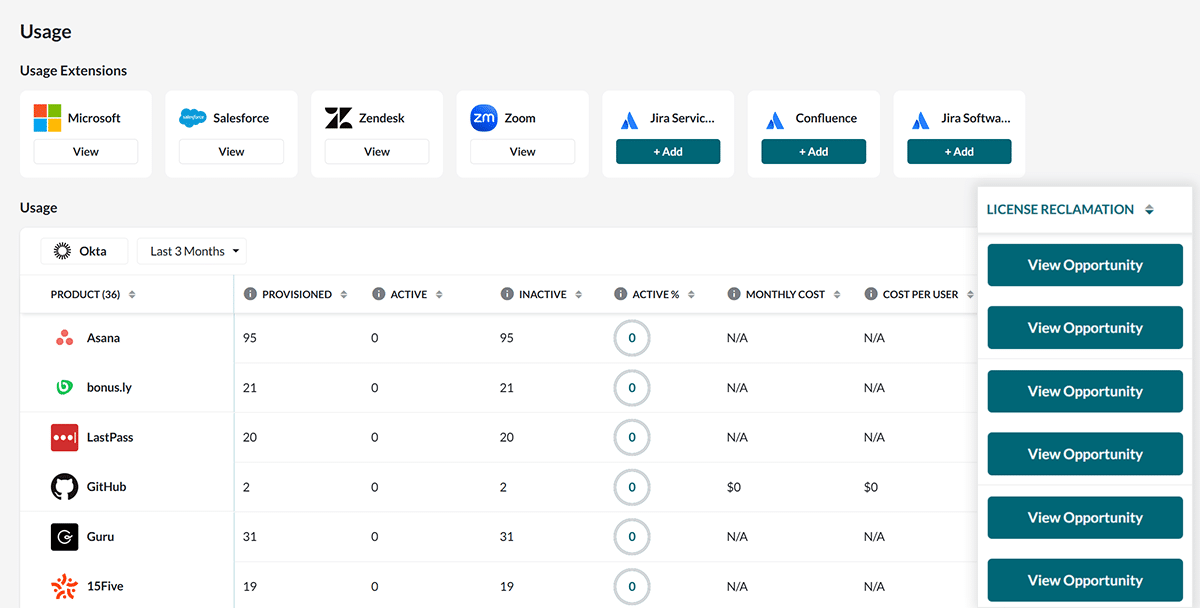
Instead of manually running reports and trying to track down stale licenses, BetterCloud can automate the entire process:
- Identify: Automatically detect licenses that have been dormant for a specified period (e.g., 90 days).
- Notify: Send an automated email to the user warning them the license will be revoked unless they confirm they still need it.
- Reclaim: If the user fails to respond or indicates they don’t need it, BetterCloud automatically revokes the license and adds it back to your pool, ready to be reassigned to a new user.
This proactive approach ensures you’re never paying for shelfware again, translating directly into significant cost savings.
Embrace the full power of SaaS management
We’ve covered five powerful capabilities—from enforcing critical security controls like MFA and saving money through automated license reclamation, to empowering your users with self-service Slack tools and building sophisticated, branch-based workflows.
If you’re only using BetterCloud for basic user lifecycle management, you’re missing out on the platform’s ability to truly transform your IT operations. BetterCloud’s strength lies in its ability to automate simple and complex tasks across your entire SaaS ecosystem, turning hours of manual effort into seconds of automated execution.
By implementing these five overlooked features, you’re not just saving time; you’re proactively enhancing your organization’s security posture, dramatically improving the user experience, and reclaiming substantial budget dollars that were previously lost to unused licenses.
It’s time to move beyond the basics. If you haven’t implemented these five features yet, we encourage you to dive into the platform today and put the full power of BetterCloud to work. Your security team, finance department, and end-users will thank you.
Looking to implement one or more of these features in your BetterCloud instance? Reach out to your CSM to learn more!